So I haven't been able to find time to keep up with the blog due to work so to keep track of what I've done, here's a list of all the articles of done so far for MyVillage.
http://london.myvillage.com/article/despicable-me-minion-madness-in-london - Edited
http://london.myvillage.com/place/foundation-bar-london - Edited
http://london.myvillage.com/article/flux-by-alessandro-botto - Edited
http://norwich.myvillage.com/article/search-for-a-norwich-dance-star - Edited
http://london.myvillage.com/article/valentines-porridge-recipes - Edited
http://london.myvillage.com/article/propaganda-fridays-at-the-o2-academy-islington - Written
http://london.myvillage.com/place/imli-soho-london - Written
http://london.myvillage.com/place/cigalon-london - Written
http://london.myvillage.com/article/carmen-3d-review -Written
http://london.myvillage.com/article/true-grit-review - Written
http://london.myvillage.com/article/valentines-day-films - Edited/Written
http://london.myvillage.com/article/chinese-new-year-a-quick-food-guide - Edited
http://london.myvillage.com/article/an-evening-at-the-mynottinghill-awards-2011 - Written
http://london.myvillage.com/article/chinese-new-year-traditions-and-celebrations - Written/Edited
http://london.myvillage.com/article/film-in-february - Written
http://london.myvillage.com/article/cabaret-dining-in-london - Written
http://london.myvillage.com/article/sanctum-review - Edited
http://london.myvillage.com/article/the-michelin-guide-2011 - Written
http://london.myvillage.com/place/the-edinboro-castle-primrosehill-london - Written
http://london.myvillage.com/article/heston-blumenthal-under-the-microscope - Written
http://london.myvillage.com/article/natalie-portman-under-the-microscope - Written (Personal favourite)
http://london.myvillage.com/article/londons-best-italian-restaurants - Written
http://london.myvillage.com/article/the-restauarant-at-the-royal-academy-of-arts - Written
http://london.myvillage.com/article/january-in-film - Written
http://london.myvillage.com/article/film-reviews-for-january - Written
http://london.myvillage.com/article/digital-dining-at-inamo-St-James - Written
http://london.myvillage.com/article/the-fighter-review - Written
http://london.myvillage.com/article/must-see-new-theatre-in-london - Written
http://london.myvillage.com/article/127-hours-review - Written
Beta decay

Monday, 21 February 2011

Thursday, 6 January 2011
Review: 127 Hours

The true story of the life defining experience of Aron Ralston based on his appropriately named memoir “Between a rock and a hard place.” is one of mental fortitude and toughness not only for Ralstom (James Franco) but also for the viewer.
This film focuses on the experiences of Aron Ralston who in 2003 went hiking in the remote Canyonlands National Park to find himself pinned hopelessly beneath a boulder with no hope of rescue and scarce rations to survive. Ralstom a resourceful, energetic and adventurous individual is left isolated with little else to do than to face his own death.
Director Danny Boyle does an unparalleled job of being able to draw a viewer into the trauma of a 5 daylong struggle against not only nature but Ralstom’s own mind. As if trapped in a canyon they, the viewer has only the briefest of reprieves from the desperate scene in front of them.
The film’s only true character is Aron Ralsto played by James Franco. He serves as the films hero, villain, joker and narrator. In a Q&A, Danny Boyle stated that “You don’t see Aron Ralston, you see James Franco going through Aron Ralston’s experience.” And Franco’s outstanding performance is definitely worth seeing.

He enters the film as an adventure junkie, drawing adrenaline from nature, which he continues to challenge whether it’s traversing a canyon, racing across treacherous terrain at daring speeds or trying to shift an immovable boulder. His ultimate battle though however is when his fortress of physical ability and mental toughness is slowly dismantled by nature as in every instance where the eventual delirium wears off or a hallucination fades; Ralstom wakes up only to his nightmare.
Through the whole film you realise that the character of Ralstom isn’t alone throughout this ordeal, he is instead joined by allies and enemies within his own mind, those of a man who has turned his back on the bustling urban crowds and humanity. He’s able to relay his ordeal to his loved ones through his video camera which acts as a portal to the civilization he has abandoned. During his time in the canyon, Ralstom’s superhuman physicality and independence is eroded away and he progresses to become a man once again, realising his reliance on those he loves and has left behind.
The cinematography throughout the film is remarkable; the connection between the camera and the subject is hauntingly in sync. Working in such confined spaces, presents its obvious challenges however directors of photography Anthony Dod Mantle and Enrique Chediak, overcome these obstacles with brilliant innovation and place you with front row seats to witness Ralstom and his plight.

The score to the movie keeps this high bar hitting spectacle in place constantly as both original music and licensed music is positioned perfectly to portray desperate, bleak and surreal situations. Boyle draws songs from the collective libraries which we all have, to tremendous affect, in particular Bill Wither’s “Lovely Day” which is applied with great irony.
A viewer’s psyche will be taxed throughout which only nurses the empathy that one has to the subject, one which evolves into a genuine sense of respect for the person that James Franco portrays and for that, the viewer is rewarded with an incredibly powerful piece of cinema.
Not everyone will be trapped in a canyon pinned by a boulder however at some point in everyone’s lives; people will be able to relate to the adversity of facing an impossible situation and 127 hours will tug on those emotions evoked from such a scenario.
This review can also be found at MyVillage
Tuesday, 4 January 2011
The Social Network Review
 In July 2009, the script for The Social Network was leaked on the internet. Critics were puzzled with who would be interested in a film about a website, especially one which has a relatively small amount of controversy and with little to no input by any of the real life principals. Regardless of the source information, as a film The Social Network has gone on to receive critical acclaim. I personally didn’t watch any of the trailers nor did I register it as one of my must see films, however the opportunity to watch it came up recently so I decided to see what the buzz was about.
 The story revolves around the life of Mark Zuckerberg when he created Facebook from a dorm room in Harvard and how he and others developed it, to become what we all know today.
Jesse Eisenberg takes on the role of Mark Zuckerberg and delivers a fantastic performance of a geeky sociopath. While reserved the majority of the time, his brief outbursts of social interaction are strong, confident and clever. Eisenberg’s performance dominates the scene every time he walks into a room and even when he leaves one. Throughout the film though, the character of Mark Zuckerberg is continually under attack by the Winklevoss twins (both played by Armie Stammer), Divya Narenda (Max Minghella) and Zuckerberg’s then best friend Eduardo Saverin (Andrew Garfield).
The performances by all the aforementioned actors are outstanding, in particular Armie Stammer’s. The ability to deliver not one but two strong and memorable roles each with a unique personality is a feat which is rarely accomplished although recent memory does remind me of Jeff Bridges’ performance in Tron: Legacy. Not a bad name to be mentioned with in a conversation.

The soundtrack for The Social Network is something special indeed. Composed by Trent Reznor and Atticus Ross, The Social Network soundtrack ranges from hauntingly beautiful to pulsingly hypnotic to grandiose and overwhelming. Each song suits its scene perfectly. The soundtrack draws you into the rollercoaster world which is being told while still registering as a standalone piece of brilliance. Of note is “In the Hall of the Mountain King” written by the 18th century Norwegian composer Edvard Grieg. Reznor and Ross put a slight electronic twist to it that allows it to stand alone in a scene where all other audio is muted. And it works.
The storyline is both The Social Network’s strongest forte as well as its primary source of controversy. As a film, the story is fantastic, gripping and is told in a way which keeps the viewer constantly engrossed, constantly focused in and soaking up all the information that is dispensed. Nothing in the film seems to be put in for no reason whatsoever and every scene is delivered with brilliant dialogue and impact, while at the same time not being too overwhelming. The audience doesn’t need to know all the computer whiz techno-jargon or in-jokes however it all is still appreciated. The Social Network is not about the site itself but is first and foremost a story of relationships and how they’re affected by business.
At the same time, it should be noted that the big controversy that surrounds The Social Network is around the accuracy of the story. The screenwriter Aaron Sorkin stated that “I don’t want my fidelity to be to the truth; I want it to be to storytelling. What is the big deal about accuracy purely for accuracy’s sake, and can we not have the true be the enemy of the good?”
Much of the screenplay is fictionalised and it is definitely a dramatization of history. While the names are the same, the characters do not portray their real life personas whatsoever. The underlying story arc in The Social Network is of the relationship between Mark Zuckerberg and his ex-girlfriend Erica Albright and how Facebook was a way for him to prove himself. Whether this was the case or not, no one truly knows however much of the film is based on these loose rumours turned fact. Ultimately The Social Network is not a documentary. If you wish to find out who Mark Zuckerberg actually is, then The Social Network is not essential viewing.
Leaving the cinema I had a conversation with a friend about who our favourite characters was and the answers were definitely polarised. There’s something special to be said about a story where everyone can find a hero in it but they won’t necessarily be the same character. It gets you to ask questions and keeps you in the dramatised world even after leaving the cinema. It is a fantastic process to experience, one that unfortunately not enough films impart on viewers.
For a great story, strong acting and an all around well delivered film. The Social Network definitely delivers on that part. However don’t go in expecting a documentary on the life and story of Mark Zuckerberg and the genesis of Facebook.
Thursday, 30 December 2010
My computer’s health diet
For technophiles like myself, the most persistent obstacle we face is the turnover of technology. Innovation is a predator and its prey is whatever the current standard is. Like a resilient case of Herpes, the turnover of technology is a problem that technophiles face that will lie dormant biding its time and then one day it will reveal itself and greet you like a familiar foe. Technology that was cutting edge will become obsolete and I find it most apparent when it comes to my own PC. 
My desktop has been through countless upgrades; program purges, defrags and reformats so that its capabilities will always be able to accommodate my ever growing needs. Needs which increase in hunger as something new pops along which requires a more stable, more powerful platform. The way in which I care for the performance of my desktop is something I’m quite proud of.
In contrast many of my friends, have an innumerate number of problems which plagues the health of their computers and it pains me every time whenever I have to borrow a friend’s laptop, that I’ll have to slay waves of pop ups that’ll rudely nudge you to schedule in some tender loving care for the computer.
Whether it’s a reminder to update a piece of software which has never been utilised in the life of the computer, a request to backup all of a computer’s memory to Iomega ZIP disks (yes this has happened) or a prompt to update a piece of spyware disguised as anti-malware. The vast majority of these issues I encounter on one off occasions and issues which my friends have to face every day are completely avoidable.
So while jotting down the list of my most valuable applications that protect my computer from these problems, I also felt inclined to include my favourite applications even if they were recreational because I feel that maximizing the capabilities of what a system can do, is just as important to the life of a computer as staving off its obsoletion. What I love most about the list I wrote down? All the programs are free!
Spybot S&D
The greatest fear that users have for their computers is malicious software getting onto their systems, messing everything up and causing havoc. A program which hogs up all the resources of a system or prevents it from performing desired functions will just evoke a reaction of doom and gloom. It’s why anti-malware software is deemed and agreed upon as essential for any system. The big problem though is that most commercial anti-malware software is based on a subscription model and not everyone has the luxury to dole out cash every year to keep a subscription running where you don’t witness the results. Without an improvement to your system, users aren’t even sure if the antivirus software is even necessary and then that’s where the repeated pop-ups come up that remind you that your computer is vulnerable to a sea of malicious bugs which will end the world unless you break out your wallet and hand over your money.
Well here’s my solution, Spybot Search & Destroy. A free, popular spyware and adware removal program with a badass name that runs on Windows. Ever since I installed it, I have never had unwanted programs appear that try to trick me into installing more fake programs that will cannibalise all of my information or programs that appear that I never recalled installing. This is the first application which I install on any new and clean system. I keep a setup file on my backups as obviously to get at it I need to access the internet however without a direct address to the site (and even then), my computer will already be vulnerable.
The only downside is that it slightly encumbers the resources on your system and that now and then it will prompt you any time a program tries to alter your computer’s registry file which includes whenever you intentionally want to install a program. This is however a rare issue and a petty one at that. Also the program’s footprint is far smaller than any of the other anti-virus programs I’ve used and the alternative to run a naked computer on the internet would be far more problematic.
Spybot S&D GB-EN site:
http://www.safer-networking.org/en/index.html
Also see: Trend Micro’s “HouseCall” site, a browser based anti-malware scanner.
http://housecall.trendmicro.com/uk/

WinDirStat
Anyone who’s run out of hard disk drive space will encounter the problem of trying to locate where their most bloated files are. Window’s own capabilities to locate the big boned files and folders; I find are woefully inadequate. WinDirStat provides an elegant solution. It will in a relatively short space of time scan through a targeted directory and provide you with information of where and what proportion of your disk space is being occupied.
Armed with these statistics, you’ll be all the better informed of where and what to get rid of and before long your hard drive will be a lean, mean, memory storing machine.
WinDirStat site:

Firefox
Firefox isn’t new and I’m sure many people reading this blog will be reading it using a Firefox browser. The great thing about Firefox which I love the most though is the wide variety of add-ons. To be honest I don’t see much difference in function between Firefox, Safari, Internet Explorer and Google Chrome. None of them are handicapped in their capabilities compared to the others and to me they’re all equally as useful. However some were made more equal than others and for me that’s where Firefox stands out. It’s the community add-ons which you can incorporate from skins, to toolbars, video players and little scripts. All of a sudden your browser can be customized to become your browser. On mine I have the ‘NASA Night Launch theme’, various video player plug-ins, the invaluable BlockSite and probably my recent favourite add-on, Flashblock which replaces Flash objects with a button which you click on if you want to view them. This severely saves on system resources and prevents a lot of annoying adverts.
Treat yourself a bit, go check out what add-ons you can put to your browser to make internet browsing that little bit more fun.
Firefox:
Firefox Add-on site:
https://addons.mozilla.org/en-US/firefox/

Rainmeter
A brilliant hybrid of practical and recreational, form and function; Rainmeter is a desktop customization platform. This is a lot different from changing the theme of your Windows. Rainmeter changes your static desktop into a hub of interactivity and a brilliant facet of Rainmeter is the numerous gadgets (skins) you can compile together.
Rainmeter essentially acts as an interactive overlay for your desktop. On mine I have a large skin which displays the date and time on my desktop as well as numerous little tools which include information on my network traffic, how much of my computer’s resources are being used and quick links to some of my most used applications. Everything looks gorgeous, slick and it always impresses people when they see it.
I haven’t personally indulged in everything which Rainmeter has to offer which includes an RSS reader and Twitter feed however I’m sure in the near future I’ll get around to searching for those and educating myself in their use.
Rainmeter isn’t without its flaws though. The bare UI has left much to be desired and you’ll frequently have to navigate a complex Jenga of right-click hover menus and text based settings which can be intimidating. The results when performed correctly however are truly spectacular.
Rainmeter:
http://rainmeter.net/RainCMS/?q=About

Spotify (Free)
While not an essential piece of software; as mentioned in a previous blog post, Spotify truly offers a vast library of music which no single (or chain) of record stores can offer. At your fingertips will be all the music you can consume and barring the occasional advert, it’s all free.
The library at your disposal is not just limited to tracks either. Spotify comes equipped with tons of information about artists. A feature which I find remarkably useful is the “related artists” links when I feel that my appetite in a particular genre of music just isn’t quite sated. You can add that single track you love from an obscure artist to an already comprehensive playlist. And once you’re done you can then share your collage of music with friends on Facebook who can conversely subscribe and have a quick link to your mini-masterpiece. This also performs a fantastic function for when you’re at a friend’s house and you want to listen to your playlist(s).
On more than several occasions I have formulated the perfect concoction of tracks for a particular event such as for a Poker evening or themed party. I couldn’t handle having to queue up tracks on Youtube on request or be limited by the confines of the library which was available on my iPhone which may or may not have had the ideal mood music. Spotify offers a simple and refined solution to both problems.
Spotify:

Msconfig.exe
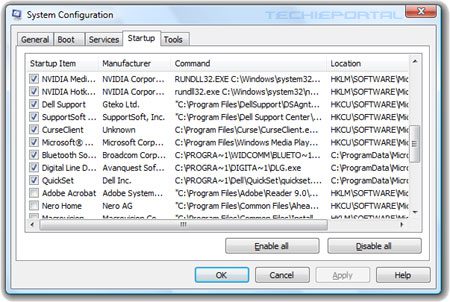
Now unlike the other programs and tools on this list, msconfig.exe is one which every Windows user already has. Do some research on it and you’ll realise that it’s quite a powerful program.
The Microsoft System Configuration Utility (MSCONFIG) is a tool that can help you troubleshoot program related problems with your OS via a small and to the point interface. Although intimidating at a glance, even a fair understanding of MSCONFIG will be able to help you cull those annoying start-up notices you get from various programs and even customise which programs you want to boot-up when you turn on your system. A useful hour or two spent on educating yourself about MSCONFIG has the potential to near enlighten your digital experience when using Windows. Not a bad option when that hour would otherwise be spent wasted watching the X-Factor.*
The downside however is that MSCONFIG is as previously mentioned a powerful tool and when utilised clumsily can cause a whole mess of problems. Many items which you may deem as essential to the everyday running of your computer are perceived as optional by Windows and you might accidently turn off a process or service that is required by your applications to function sooner or later. So do a hint of research on what you should or shouldn’t turn off. It’ll be worth it.
Discovering the existence MSCONFIG has just made the boot-up process remarkably smoother. No more notifications to update oft-unused pieces of software, or intensive programs that run in the background during the whole operation of my computer that I only need to use them for 5 or 10 minutes.
MSConfig Wikipedia page:
http://en.wikipedia.org/wiki/MSConfig
Honourable mention:
Steam
This is a much more niche program when compared to others and is targeted directly towards the gamer inclined demographic, so if you have no interest in PC games, there will be little here of interest.
Steam released by Valve Corporation is a digital distribution platform. It’s a very simple concept which feels incredibly foreign the first time you use it. On Steam you can buy video games however instead of paying for delivery of a disc via good ol’ van and stamp or braving the hostile outdoor environment** to get to a retailer, the Steam client will download the game straight to your computer. Not only that but wherever you log onto the internet and have access to the Steam client, you can download and install your game. Gone are the days of having to keep a disc in your disc tray or carrying around with you books of CDs and DVDs. Now it all comes right through the wire (or air even!).
While the digital distribution aspect of Steam is the meat of the client, the garnishing really tops it all off. Through the Steam platform you become part of a community where you can add each other, befriend fellow gamers both in and out of game, chat with them, invite them to play other games in your mutual libraries or compare stats for bragging rights. User formed communities’ spring up for fans of certain games and forums are provided to really get your nerd on with other fans.
The Steam client also provides you a portal to gaming related news specific to the games that you buy and will automatically patch your games for you. The arduous task of having to navigate the internet for the specific patch for a game with the specific version number is all handled for you by the trusty Steam platform. You don’t need to worry about whether you need to install a series of incremental patches or a big beefy patch or whether whatever it is that you’re downloading is even legitimate!
The crème de la crème of the Steam platform though is the Steam sales. Often the good folks over at Valve Co. will feel generous and just slash games up to 95% off. The prices on Steam adjust itself and games will get cheaper over time just like how they do in a retail store. Currently on Steam is their Winter Sale and for 21 days they’re offering unheard of discounts. If I thought I had a large backlog of games I wanted to get through last month; If only I had known what was to come. The list has now tripled itself in size with all the indie games at bargain prices I got and various publisher packs on offer. This is even with restraint! I could have easily bought 5 times the number of games that I have, I just had to draw a line somewhere. Of all the downsides to have, this is a very nice dilemma to have. To be offered too much for your money.

*Apologies to the creators of X-Factor. I do not mean to slight your obnoxious show in any way.
**Research done on the internet has revealed that The Outdoors contains various dangers which include avalanche, bears (BOTH the Polar and Grizzly variant!), Poisonous Jellyfish and venomous insects. Most alarming of all is that The Outdoors also contains a 1.392 x 10⁶ km wide burning ball of hydrogen which has been known to be the culprit of uncontrolled nuclear fusion reactions causing numerous cases of cancer.
Subscribe to:
Posts (Atom)